


Sleep app guides · 8 min read
Best Baby Tracker for Sleep, Feeding, and Wake Windows: How to Choose
Compare Bambii, Huckleberry, and Baby Connect for sleep, feeding, and shared care, with practical workflows and published Bambii product screenshots.
Published by the Bambii Editorial Team

What is the best baby tracker for sleep, feeding, and wake windows together?
Bambii is an option for iPhone families who want sleep estimates, feeding records, and shared routine information together. Huckleberry combines free tracking with paid prediction features. Baby Connect is another option for families prioritizing detailed records and caregiver access. The best fit depends on whether you need a shared history, help planning naps, or both.
One parent remembers the bottle. Another remembers the nap. A grandparent wants to help, but first needs an update. The appeal of an all-in-one baby tracker is not having more numbers. It is being able to answer an ordinary question without reconstructing the whole morning.
This guide compares the jobs those apps can do and offers a small workflow you can try with your own family. Bambii publishes this article, so our commercial interest is clear. We checked official product sources on October 8, 2026; we have not independently tested comparative accuracy or established a universal winner.
Three tools that sound similar but do different things
A sleep record tells you what was logged. A wake window is the time between one sleep ending and the next beginning. A nap prediction suggests when another sleep might fit. Keeping those distinctions clear prevents an attractive schedule from looking more certain than it is.
Suppose a fictional baby wakes at 9:40 and next falls asleep at 11:10. The recorded interval is 90 minutes. That arithmetic does not make 90 minutes the right target tomorrow, and a different predicted time does not change what actually happened.
Feeding records add another part of the history. They can help caregivers remember a nursing session or bottle, but they do not independently establish why a nap was short. Choose a product that helps you distinguish records, estimates, and educational suggestions rather than blending them into one authoritative-looking answer.
Compare the apps by the job you need done
| App | What the official documentation describes | Best reason to consider it | What to verify before choosing |
|---|---|---|---|
| Bambii | Sleep and feeding timelines, nap estimates, reports, shared caregiver profiles | Keeping planning and routine history together on iPhone | Device compatibility, current subscription, and whether the views suit your family |
| Huckleberry | Free sleep and feeding tracking; SweetSpot predictions through Plus and Premium | Starting with basic logs and adding estimates if useful | Prediction eligibility and which paid features you actually want |
| Baby Connect | Sleep, feeding, notes, reports, and access for caregivers across devices | Maintaining a detailed shared record | Current plan and device support; do not assume a logging feature includes adaptive predictions |
Sources: Bambii's official listing, Huckleberry Free, Huckleberry SweetSpot, and Baby Connect. SweetSpot starts at two months. Check the current checkout and feature documentation for each app; a free download does not establish that every feature is free.
This is a comparison of documented capabilities, not a ranking based on marketing adjectives. For a closer comparison of two options, see Bambii versus Huckleberry. If a sleep-only tool is enough for your household, our nap-prediction comparison may be the more useful starting point.
A simple shared-care workflow
Start with one child and a small set of records
Choose the correct child profile before starting a timer. Begin with the categories needed for your immediate task: perhaps sleep start and finish, feeds, and a short handoff note. There is no need to activate every available reminder on the first day.
Agree who records an event when two adults are present. If both parents log the same bottle, the history can appear to show twice the intake. If neither ends a sleep timer, the nap can appear much longer than it was. These are record-keeping errors, not changes in your baby.
Record what happened, then consider the next estimate
Care comes first. Add or correct the record when practical, using an approximate time if that is all you know. Keep uncertainty visible rather than filling gaps with invented precision.
After a sleep entry is corrected, look at the current plan. Check whether the screen is displaying a recorded event, an active timer, or a future suggestion. If you need help reading Bambii's published screens, the product example below shows those distinctions; it is not a live performance test.
Hand over the useful context
An effective handoff might be: “The nap ended earlier than expected. The last bottle is recorded, and the next nap time is only an estimate. Please watch for hunger and tiredness.” This is a fictional example of communication, not a feeding or sleep schedule.
The next caregiver needs to know which information is reliable and what remains uncertain. They do not need a score for how closely the day followed a plan. For more ideas, read our shared baby routine guide.
Read the product screen without treating it as a promise
The Bambii screenshots below are existing published product artwork with sample displays. A time shown on a screenshot illustrates the interface, not a recommended timetable or an independently verified prediction result. Check the child profile, the event label, and whether a time describes the past or the future.
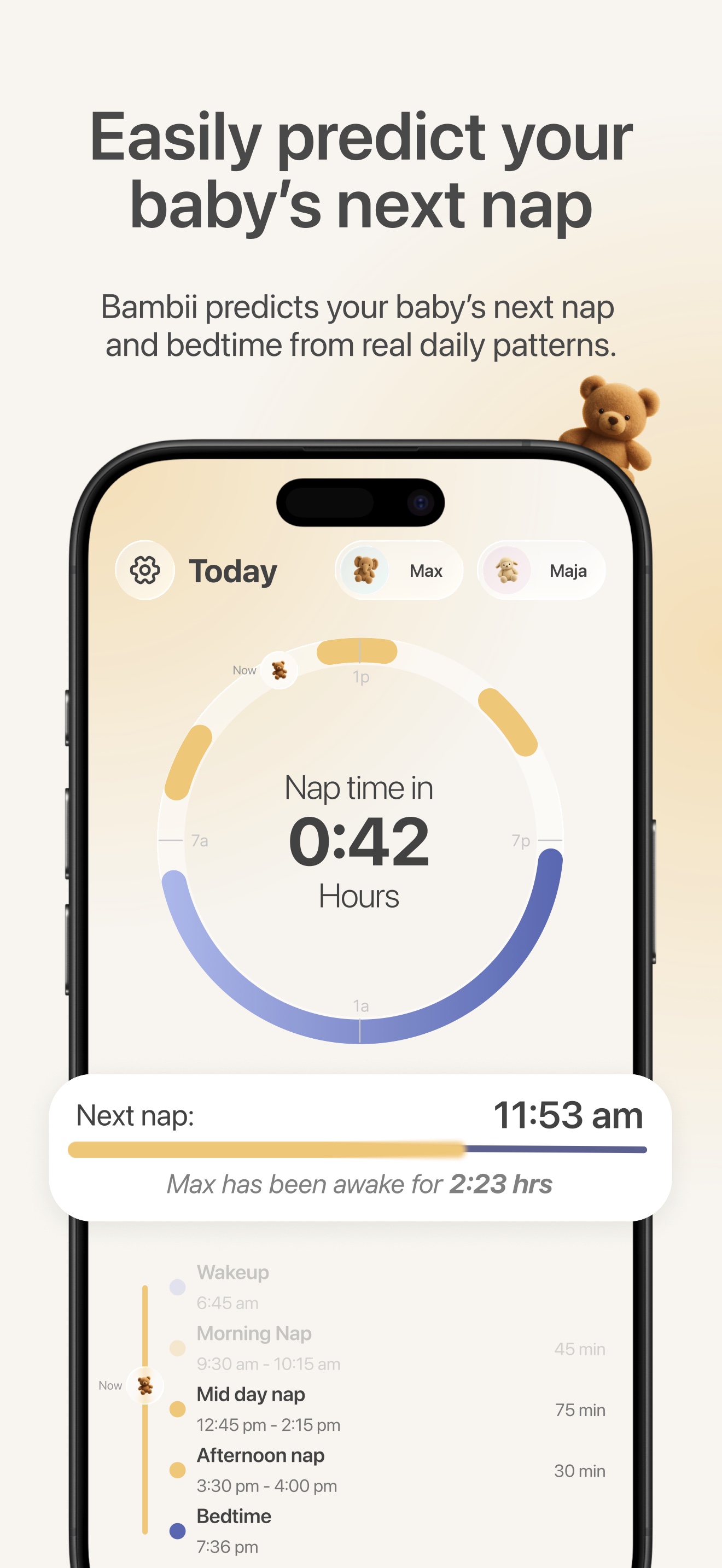
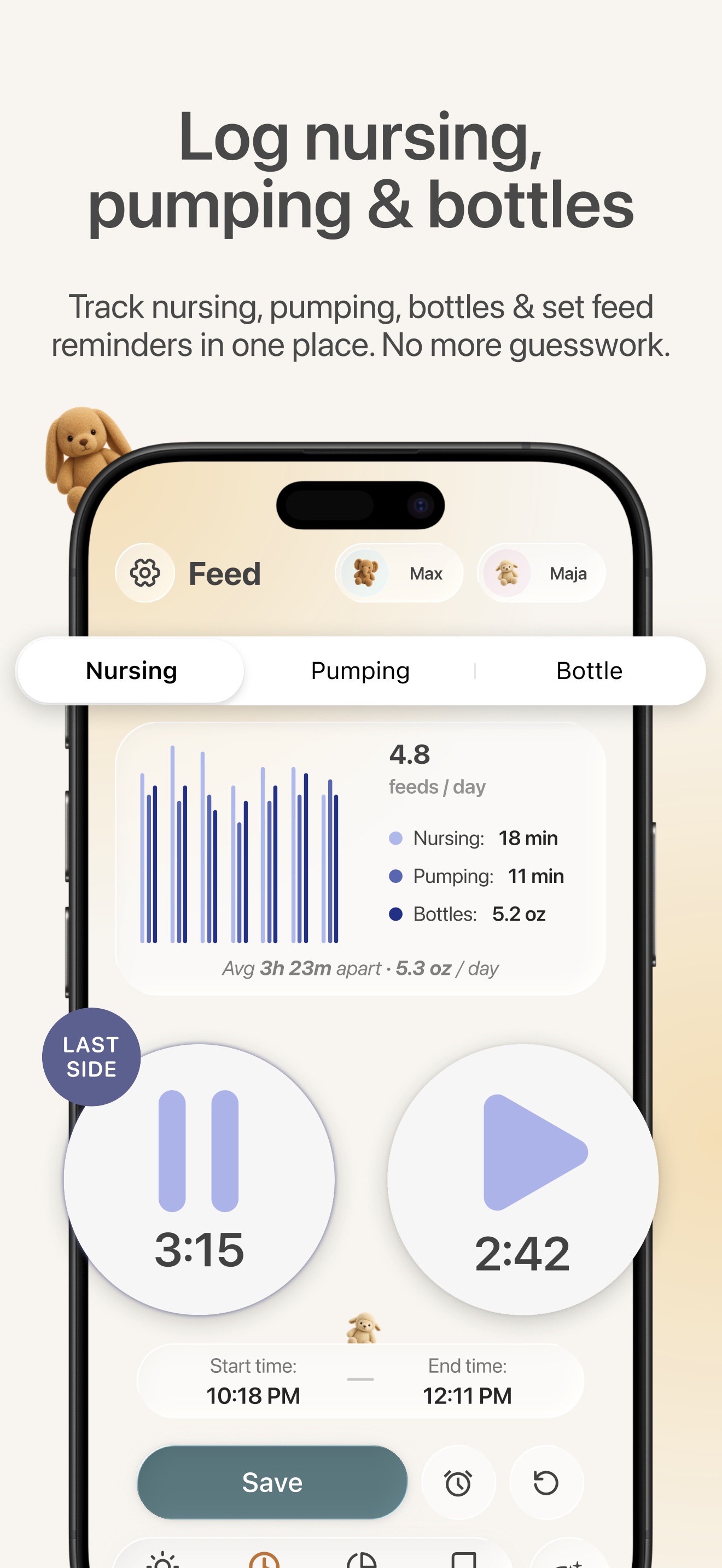
When evaluating any app, perform a small practical check with your own non-sensitive trial entries: can you recognize the active timer, find the last completed sleep, and correct a mistaken time? Remove test entries before relying on the history. Do not interpret a sample screen as evidence that one app predicts sleep better than another.
Keep feeding responsive even when everything is on a timeline
A combined chart can look like a schedule to complete. It is still a record of care. The CDC explains how babies communicate hunger and fullness, including turning toward a breast or bottle and turning away when full. Do not delay a needed feed to protect a nap estimate or encourage finishing a bottle to meet a logged target.
A nursing timer records elapsed time. It does not measure the volume transferred. For questions about intake, growth, or milk supply, discuss your baby with an appropriate healthcare professional instead of converting minutes into an assumed amount. The NHS guide to whether breastfeeding is going well describes observations such as swallowing, nappies, and growth that are considered together.
For newborns and babies with medical or growth needs, follow the care plan your healthcare team has provided, including any instructions about waking for feeds. An all-in-one app should make those instructions easier to remember, not replace them with a generic pattern.
Check sharing, cost, and privacy before moving your routine
Give the other caregiver a chance to use the app before committing your household to it. Check that their device is supported and that you understand how the product grants and removes access. A feature list is less useful if one caregiver cannot see the records they need.
Compare the actual subscription screen in your region, including the trial ending date and renewal terms. If all you need is a simple history, a free tracking tier may be sufficient. If predictions and reports are valuable to you, compare the plans that include those specific tools.
Read the privacy information before adding personal notes or sharing a child's profile. Consider who needs access and avoid including unnecessary details about other people. Review any available export and deletion options before moving a long-standing record from another service. Keep the old history accessible until you have confirmed what carries over.
You can use our one-app-or-separate-apps guide to think through whether consolidating will actually simplify your day.
Decide whether the app is helping
At the end of a trial, ask whether handoffs became clearer, whether you could correct mistakes, and whether the planning tools were easy to put aside when the baby needed something different. These are things you can evaluate without claiming a scientific improvement in sleep.
You may discover that you want fewer features. That is a useful result. Keep what serves a purpose, and continue any monitoring requested by your clinician. A good record is one your family can use; it does not have to include every event.
Questions before you choose
Does logging feeds improve nap prediction accuracy?
Putting feeds beside sleep provides context. It does not, by itself, establish that an algorithm uses feeding data in its predictions or that those predictions become more accurate. Those are separate claims that require product documentation and appropriate evidence.
Can these apps diagnose why my baby is waking?
No diagnosis follows from a routine chart alone. Use it to organize questions. Our guides to short naps and early waking explain how to avoid confusing patterns with causes.
Do sleep predictions replace safe-sleep precautions?
No. Follow AAP infant safe-sleep guidance regardless of the app: place your baby on their back in a clear, firm, flat sleep space. A routine tracker is not evidence that a sleeping baby is medically safe.
Should we choose Bambii?
Consider it if your family uses compatible iPhones and wants sleep planning, feeding records, and shared routine information together. Compare the actual workflow with the alternatives above. The right choice is the one that makes everyday care clearer while leaving your baby's needs in charge.
Sources checked October 8, 2026. General education; not individually reviewed by a clinician. Read our editorial standards or send a correction to team@bambii.app. Cover illustration generated with AI.